








Ultrasound Equipment Power-On/Off Workflow and Maintenance Essentials
Ultrasound equipment plays a critical role in modern medical diagnosis. The stability of its performance and the accuracy of its imaging directly affect the reliability of clinical diagnosis. Standardized operation of ultrasound equipment is not only a core factor in ensuring normal operation and extending service life, but also an important aspect of maintaining the quality of medical services. This article systematically outlines the standard startup and shutdown procedures, operational precautions, common operational risks, and maintenance recommendations for ultrasound equipment, for reference by medical equipment operators.
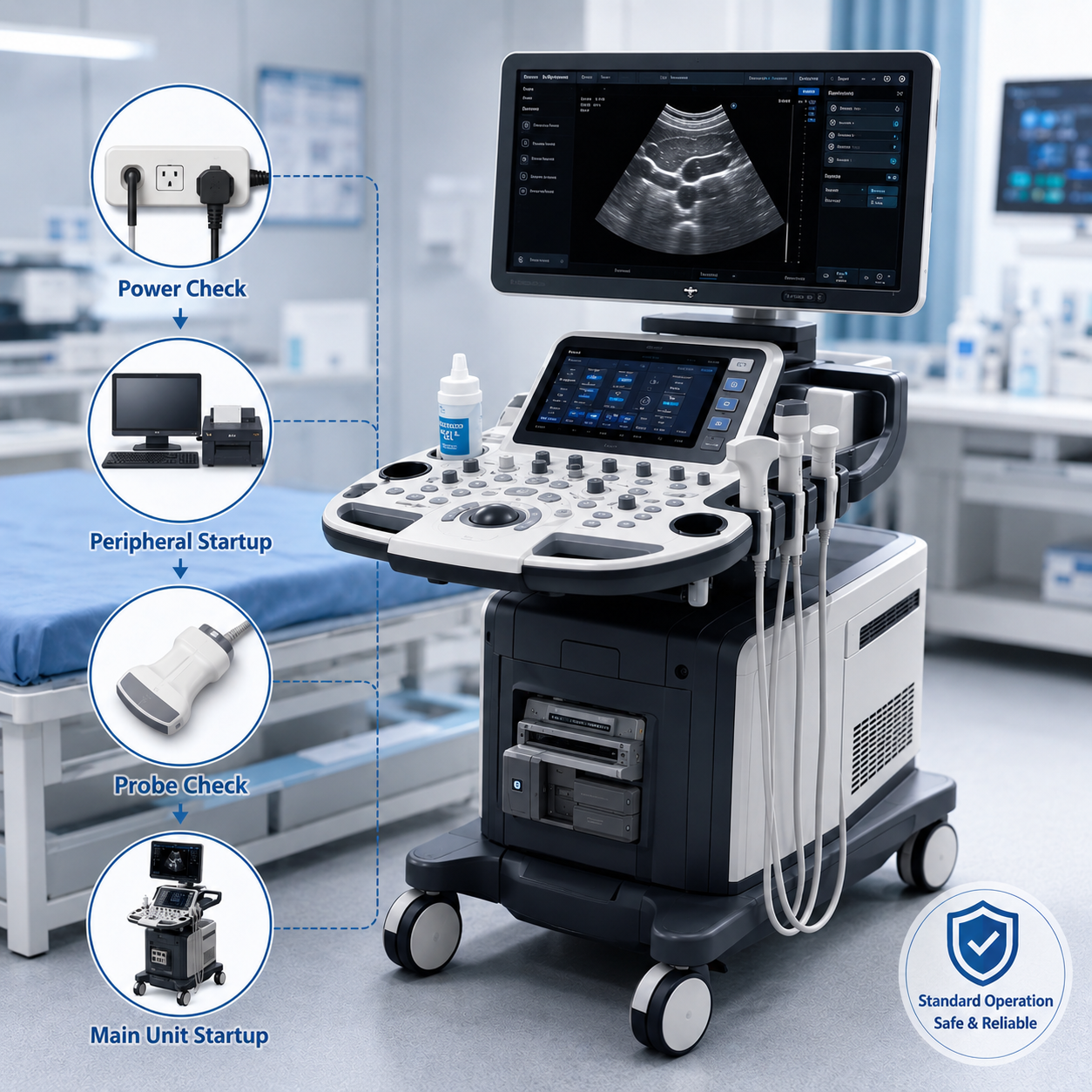
I. Preparations Before Powering On
(1) Environmental Inspection
1. Physical Conditions
- Ensure that the floor around the equipment is dry and free of liquid residue to prevent short circuits or corrosion caused by liquid infiltration into the equipment.
- A clearance space of at least 50 cm should be reserved around the equipment to ensure proper ventilation and heat dissipation. Ventilation openings must never be blocked, as poor heat dissipation may cause overheating, thereby affecting equipment performance and service life.
2. Temperature and Humidity Control
- Temperature: The ideal operating temperature range is 20–25°C (refer to the equipment manual for specific requirements). Excessive temperature may cause overheating of internal components and accelerate component aging; excessively low temperature may affect normal startup and operation.
- Humidity: Relative humidity should be controlled within 40%–60%. Excessive humidity may cause circuit shorting and damage electronic components; excessively low humidity may generate static interference, affecting signal transmission and image quality.
3. Power Supply Requirements
- Use an independent regulated power supply (220V ±10%) to ensure stable and reliable power. Grounding must be secure and reliable to effectively prevent electrical leakage and ensure the safety of operators and patients.
- When voltage instability exists, an uninterruptible power supply (UPS) should be installed to handle sudden power outages and protect equipment data and hardware from damage.
(2) Equipment Inspection
1. Appearance Inspection
- Carefully confirm that the main unit, workstation, probes, and cables are free from damage, aging, or looseness. Any visible damage may affect normal equipment operation. For example, damaged cables may interrupt signal transmission, while aged probes may affect image quality.
2. Connection Status
- Check whether data cables, probe interfaces, and monitor connections are secure. Poor contact may cause signal interference, resulting in blurred, flickering, or lost images.
3. Accessory Status
- The probe surface should be clean and free from cracks to ensure that the acoustic performance of the probe is not affected. Ultrasound gel should be uncontaminated to ensure proper ultrasound signal transmission. At the same time, verify that the emergency switch is in normal condition and has not been accidentally triggered.
II. Standard Power-On Procedures
(1) Principle
Follow the startup sequence of “power supply → peripherals → main equipment” to ensure that all components initialize and operate properly.
(2) Specific Steps
1. UPS Startup
- Check whether the battery level is ≥80%. Insufficient battery capacity may fail to support normal equipment operation during a power outage. After turning on the power, wait 1–2 minutes until the “normal power supply” indicator remains steadily lit, indicating that the UPS is operating stably.
- Abnormal Handling: If the UPS alarm is activated (such as overload alarm), immediately disconnect the load and investigate the cause of the overload, such as unnecessary devices connected to the UPS. If the issue cannot be resolved, contact an engineer for maintenance promptly.
2. Startup of Peripherals and Workstation
- Turn on peripherals such as monitors and printers in sequence to ensure that they initialize properly and establish communication with the main system.
- After starting the workstation, wait patiently for the system to load completely, including background services and medical software. During this process, avoid performing other operations that may affect loading speed or cause software startup abnormalities.
3. Ultrasound Main Unit Startup
- Press the power button of the ultrasound main unit and wait 3–5 minutes for the equipment to complete self-check and probe initialization. During self-check, the equipment automatically detects the operating status of all components and provides alarm prompts if any issues are found.
- Preheating Requirement: Some equipment requires an additional 10–15 minutes of preheating to achieve optimal imaging performance (refer to the manufacturer’s instructions). Preheating allows probes and other key components to reach stable operating temperatures, thereby improving image quality.
III. Precautions During Operation
(1) Operational Standards
1. Prohibition of Forced Restart
- When the system freezes, priority should be given to terminating unresponsive processes through the task manager. Avoid forced restart, as it may cause data loss or equipment damage.
2. Data Protection
- Save data manually every hour and enable automatic backup functions to prevent data loss caused by sudden failures or power outages.
3. External Device Management
- Hot-plugging of USB probes or dongles is prohibited. Devices must be safely ejected through the operating system.
(2) Hardware Protection
1. Video Cable Operation
- Plugging or unplugging HDMI/DP cables while powered on is strictly prohibited. Equipment power must be turned off before replacement.
2. Shockproof and Dustproof Measures
- The equipment must not be moved during operation to avoid loosening or damaging internal components due to vibration.
- Clean the equipment surface and ventilation openings daily to prevent dust accumulation from affecting heat dissipation.
3. Heat Dissipation Management
- Continuous equipment operation time should not exceed 8 hours. In high-temperature environments, operating duration should be further reduced.
IV. Standard Shutdown Procedures
(1) Sequence
Follow the shutdown sequence of “ultrasound main unit → workstation → peripherals → UPS” to ensure safe data storage and proper shutdown of all components.
(2) Specific Steps
1. Shutdown of Ultrasound Main Unit
- Save patient data, exit the software according to standard procedures, and then power off the equipment.
- After shutdown, return the probe to its designated position and clean off any remaining ultrasound gel to prevent dried gel from affecting probe performance.
2. Shutdown of Workstation and Peripherals
- Exit all programs before shutting down the operating system to ensure normal system shutdown and avoid data loss or system failure caused by improperly terminated programs.
- Then turn off peripheral devices such as monitors and printers.
3. UPS Shutdown
- Press and hold the UPS power button until the unit is completely powered off.
- During thunderstorms, disconnect the mains power supply to prevent lightning damage to the equipment.
V. Common Improper Operations and Risks
| Improper Operation | Potential Risks |
|---|---|
| Incorrect shutdown sequence (e.g., turning off UPS first) | Data loss, physical hard drive damage |
| Plugging/unplugging cables while powered on | Burned interfaces, graphics card failure |
| Ignoring humidity control | Circuit board short circuit, probe mold growth |
VI. Maintenance and Emergency Recommendations
(1) Regular Maintenance
1. Monthly Disk Defragmentation
- Regular disk defragmentation of the workstation can improve system operating speed and data read/write efficiency.
2. Quarterly Calibration of Probes and Imaging Parameters
- Calibration of probes and imaging parameters ensures that imaging quality remains at optimal levels and provides accurate and reliable images for clinical diagnosis.
(2) Emergency Measures
1. Backup Power Supply and Emergency Lighting
- In the event of sudden power failure, backup power supplies ensure sufficient time for data saving and proper equipment shutdown.
2. Prioritize Data Saving During Sudden Power Outage
- In the event of sudden power interruption, medical personnel should immediately take measures to save patient data currently being processed.
(3) Personnel Training
1. Certified Operation
- Operators must receive professional training and obtain relevant qualification certificates before operating the equipment.
2. Annual Refresher Training and Updated Manufacturer Guidelines
- Annual refresher training enables operators to stay informed of the latest operational methods and maintenance essentials.
Conclusion
Standardized operation of ultrasound equipment can significantly extend equipment service life by 5–8 years and reduce sudden failure rates by more than 85%. Equipment performance depends on every operational detail. Therefore, standardized procedures must be strictly followed to provide reliable support for clinical diagnosis.